What Is AI Automation? (Simple Explanation)
AI automation is when software does not just follow the rules, but it thinks, adapts, and decides what to do next.
Traditional automation was like giving a robot a checklist. AI automation is like giving it a brain.
Before we go deeper, here’s the simplest breakdown that even your non-tech readers will love:
Automation vs AI Automation vs Agentic Workflows
Type | How It Works | Limitations | Where It Shines |
Traditional Automation | Follows fixed rules and logic (“if X → do Y”). | Breaks when input changes; no reasoning. | Repetitive, predictable tasks. |
AI Automation | Uses ML/LLMs to understand, decide, and adapt. | Needs training data + guardrails. | Document processing, summarization, support, personalization. |
Agentic Workflows (AI Agents) | Multi-step sequences where AI plans, reasons, uses tools, and executes tasks autonomously. | Requires monitoring and evaluation. | Research, operations, outreach, multi-tool workflows. |
An easy way to understand it is:
- Automation = A Machine that follows instructions
- AI automation = A Machine that understands instructions
- AI agents = A Machine completes the task from end-to-end
This is why every company, from SaaS to retail to finance, are shifting towards AI automation instead of sticking to the traditional rule-based systems.
Why 2025–2026 Is the Breakout Moment?
Three forces collided at the same time:
LLMs became “action models,” not chat models.
OpenAI, Google, and Anthropic upgraded models to use tools, call APIs, browse data, create workflows, and make decisions.
Businesses want results, not conversations.
Executives no longer care if AI can “talk nicely.”
They want:
- Lower costs
- Faster output
- Automated operations
- Fewer manual workflows
AI automation delivers exactly that.
Agent frameworks matured (finally).
Tools like:
- LangGraph
- OpenAI Agents
- CrewAI
- AutoGen
- Zapier AI
- Make AI
…made it easy to build agents that can:
- Collect information
- Analyze it
- Decide the next step
- Execute actions
- Loop until completion
You no longer need a PhD to build automation.
Companies realized AI copilots don’t scale but agents do.
Copilots help.
Agents perform.
Huge difference.
Hiring shortages pushed leaders toward automation.
Companies can’t hire fast enough as they have to go through the entire process to hire the right one.
And AI fills that operational gap.
What Are AI Agents?
As we know AI agents think, plan, take actions, use tools, and complete tasks end-to-end.
If LLMs are the brain, AI agents are the workers who go out and actually get things done.
Let’s break this down in a table format, so you can easily save it for future use.
Agents vs LLMs (The Simplest Explanation Ever)
LLMs | AI Agents |
Generate text | Generate actions |
Answer questions | Take multi-step decisions |
No memory of tasks | Maintain state, memory, and goals |
Reactive | Proactive and task-oriented |
You drive the conversation | They drive the workflow |
In simple words, LLMs are like smart assistants and Agents are like smart interns who actually do the work.
Agents vs Chatbots (Huge Difference, Most People Miss This)
Chatbots | AI Agents |
Respond to user queries | Operate independently |
Single-step replies | Multi-step reasoning |
No tool usage | Use tools, APIs, CRMs, email, browsers |
Follow scripts | Adapt based on context |
Goal: conversation | Goal: completion |
Chatbots = Conversation
Agents = Outcomes
This is why companies are replacing old bots with agent systems.
Single-Agent vs Multi-Agent Systems
Not all agents are created equal.
There are two main flavors:
Single-Agent Systems
Single-agent systems is One agent that handles an entire task.
Example:
A research agent that reads a document, summarizes it, and formats a report.
Best for:
- Single workflow automation
- Customer support agents
- Document processing
- Lead qualification
Multi-Agent Systems (MAS)
Multiple agents collaborate, each with a different “role” or speciality.
Example:
- One agent researches
- Another analyzes
- Another writes
- Another evaluates
- Another sends the email
This is how teams are building “AI departments” inside companies.
Best for:
- Complex workflows
- Business operations
- Marketing campaign creation
- Data analysis + content + outreach loops
- End-to-end autonomous systems
Frameworks like LangGraph, AutoGen, CrewAI, and OpenAI Agents make MAS systems easier than ever.
Where AI Agents Are Used Today (Real Examples)
AI agents are already operating inside thousands of companies:
Marketing
- Build full campaigns
- Run competitor research
- Generate content
- Launch ads
Sales
- Score leads
- Write outreach
- Book meetings
Customer Support
- Resolve tickets
- Find answers in policy docs
- Update CRM
Operations
- Process invoices
- Clean datasets
- Generate reports
Product Teams
- Analyze feedback
- Summarize bugs
- Draft PRDs
Engineering
- Auto-generate tests
- Debug code
- Write documentation
HR
- Screen resumes
- Schedule interviews
- Generate JD drafts
Executives
- Daily briefings
- Market research
- Email triage
Agents are cheap, fast, and already replacing dozens of manual workflows and creating new jobs.
Types of AI Automation
AI Automation works in five layers and each one is powerful than the last one.
Most of the companies begin with task automation and gradually they move towards end-to-end automation as they mature.
Let’s see how it exactly does.
Task Automation (Single, Small, Repetitive Tasks)
This is the simplest type: AI handles one isolated task that humans used to do manually.
Examples
- Summarizing emails
- Extracting data from invoices
- Writing a quick reply
- Translating text
- Converting voice → text
Best For
Businesses starting small or modernizing old workflows.
Why It Matters
It saves minutes per task… which becomes hours per week.
Workflow Automation (Multi-Step Processes)
In this workflow, AI automates sequences, not just actions.
Think of it like connecting dots from start → finish.
Examples
- Process a customer complaint → summarize → assign priority → update CRM
- Take meeting notes → summarize → convert into tasks → assign to team
- Read a document → extract key fields → populate into dashboard
Best For
Teams who are drowning in repetitive admin work.
Why It Matters
You replace multiple manual steps with a single automated flow.
Decision Automation (AI Chooses What Happens Next)
This is when AI starts making judgment calls, not just tasks.
Examples
- “Should this customer get a refund?”
- “Is this lead qualified?”
- “Is this transaction fraudulent?”
- “Which support ticket needs urgent escalation?”
What’s Needed
- Policies
- Rules
- Historical data
- Guardrails
Why It Matters
AI handles the thinking → humans only approve exceptions.
Knowledge Automation (AI Uses Your Company’s Brain)
This is where AI becomes your internal “knowledge worker.”
It reads everything your company knows like documents, SOPs, emails, chats, policies and uses it in real-time.
Examples
- Support agent that answers based on internal docs
- AI lawyer trained on contract libraries
- AI HR assistant trained on policies
- AI PM trained on product history
Best For
Companies with too much information and too little time.
Why It Matters
No more “Where do I find this file?” → AI answers instantly.
End-to-End Business Automation (The Final Form)
This is where AI handles an entire business process from start to finish with humans stepping in only when needed.
Examples
- Customer support from intake → resolution → follow-up
- Lead generation from research → writing → outreach → booking
- Content production from brief → research → writing → publishing
- HR onboarding from documentation → training → scheduling
Looks Like
- AI operates as a team, not a tool
- Often uses multi-agent systems
- Runs daily without supervision
Why It Matters
This is where companies save thousands of hours and millions in operational cost.
Quick Comparison Table
Type of Automation | What It Does | Complexity | ROI Potential |
Task Automation | One action | Low | Low–Medium |
Workflow Automation | Multi-step sequences | Medium | Medium |
Decision Automation | Makes choices | Medium–High | High |
Knowledge Automation | Uses internal knowledge | High | High |
End-to-End Automation | Entire processes | Very High | Very High |
150+ AI Automation Examples (The Ultimate Breakdown)
Marketing Automation (10 Examples)
AI has become the backbone of modern marketing — from content to campaigns to analytics.
Below are the most practical automations teams deploy today.
Automation Example | What It Does | Tool Ideas |
1. Content Outline Generator | Creates SEO-optimized outlines instantly | GPT, Jasper |
2. Blog Draft Writer | Produces first-draft long-form content | Gemini, Claude |
3. Social Media Post Creator | Auto-writes posts for all platforms | Buffer AI, Hootsuite AI |
4. Keyword Clustering | Groups keywords into topical clusters | Surfer AI, Frase |
5. Competitor Content Analysis | Summarizes competitor strategy | ChatGPT + browser |
6. Ad Copy Generation | Creates variations for A/B testing | Meta AI, Google Ads AI |
7. Email Personalization | Customizes subject lines + body | Mailchimp AI |
8. Landing Page Copy Builder | Auto-generates high-conversion copy | Copy.ai |
9. Image Generation for Creatives | Creates ad visuals and illustrations | Midjourney, Leonardo |
10. Marketing Report Automation | Weekly/monthly summary dashboards | Looker Studio + GPT |
Sales Automation (10 Examples)
AI automates prospecting, outreach, qualification, and follow-ups — freeing reps to close.
Automation Example | What It Does | Tool Ideas |
11. Lead Research Agent | Finds company + contact info | Clay + GPT |
12. Email Outreach Generator | Writes personalized emails | Lemlist AI |
13. LinkedIn Personalization | Auto-writes connection messages | Taplio AI |
14. Lead Scoring Model | Scores leads based on intent | HubSpot AI |
15. Meeting Notes → CRM Update | Converts notes to CRM entries | Notion AI, Rewokable |
16. Proposal Drafting | Drafts proposals instantly | ChatGPT |
17. Pipeline Forecasting | Predicts closing likelihood | Salesforce AI |
18. Sales Call Summaries | Auto-summarizes Zoom calls | Fireflies AI |
19. Follow-Up Automation | Generates timing + message | Apollo AI |
20. Competitor Pricing Monitor | Tracks competitor changes | Custom GPT agent |
HR Automation (10 Examples)
Hiring and employee operations become significantly faster with AI.
Automation Example | What It Does | Tools |
21. Resume Screening | Filters candidates instantly | Hireflix AI |
22. Job Description Writer | Drafts roles in seconds | ChatGPT |
23. Interview Question Generator | Creates skill-based questions | Claude |
24. Candidate Ranking | Scores candidates via skill match | Greenhouse AI |
25. Automated Onboarding Flow | Guides new hires | Notion AI |
26. HR Policy Assistant | Answers internal queries | RAG Bot |
27. Employee Feedback Summaries | Extracts insights | Fireflies AI |
28. Performance Review Drafting | Drafts appraisal notes | GPT |
29. Payroll Error Detection | Finds anomalies | ML models |
30. Training Recommendations | Suggests learning tracks | Udemy AI |
Finance Automation (10 Examples)
AI eliminates repetitive financial operations while improving accuracy.
Example | What It Does | Tools |
31. Invoice OCR Extraction | Extracts invoice data | GCP Document AI |
32. Expense Categorization | Classifies expenses | QuickBooks AI |
33. Fraud Detection Alerts | Flags anomalies | ML models |
34. Financial Report Writer | Drafts monthly summaries | GPT |
35. Cash Flow Forecasting | Predicts inflows/outflows | Python ML |
36. Tax Document Sorting | Auto-organizes files | OCR + AI |
37. Vendor Comparison Agent | Compares quotes | Custom agents |
38. Automated Reconciliation | Matches transactions | Excel AI |
39. Credit Scoring | Evaluates risk | ML scoring |
40. Audit Trail Generator | Documents decisions | Rewokable |
Customer Support Automation (10 Examples)
AI cuts support load by 40–70% while improving response times.
Example | What It Does | Tools |
41. Ticket Triage Bot | Determines priority + routing | Zendesk AI |
42. AI Reply Generator | Suggests replies | Intercom AI |
43. Knowledge Base Assistant | Answers from docs | RAG |
44. Sentiment Classifier | Detects customer emotions | NLP models |
45. Escalation Prediction | Flags risky tickets | ML |
46. Auto-Tagging Tickets | Adds categories | Freshdesk AI |
47. Support Summary Agent | Daily support insights | GPT |
48. Multilingual Support Bot | Auto-translates responses | Gemini |
49. Return/Refund Bot | Handles refund policy logic | Shopify AI |
50. NPS Survey Writer | Creates automated feedback loops | Delighted AI |
Product Management Automation (10 Examples)
Product teams use AI for research, planning, and prioritization.
Example | What It Does | Tools |
51. User Feedback Clustering | Groups complaints | ML models |
52. PRD Generator | Writes product requirement docs | GPT |
53. Feature Score Calculator | Ranks features | Custom ML |
54. Release Note Writer | Auto-generates notes | Notion AI |
55. Competitor Analysis Agent | Summarizes competition | BrowserGPT |
56. Roadmap Suggestion Tool | Suggests plans | LLM |
57. User Journey Analyzer | Highlights friction | Analytics + GPT |
58. Beta User Insights Bot | Summaries from testers | Fireflies |
59. Product Strategy Writer | Drafts strategy docs | Claude |
60. Churn Pattern Detection | Identifies reasons for drop-offs | ML |
Engineering & DevOps Automation (10 Examples)
A massive time-saver for developers and infra teams.
Example | What It Does | Tools |
61. Code Refactor Suggestion | Suggests improvements | GitHub Copilot |
62. Unit Test Generator | Auto-writes tests | GPT |
63. Bug Explanation Agent | Explains errors | Claude |
64. Log Analyzer | Finds anomalies | ML |
65. CI/CD Failure Diagnosis | Auto-explains failures | Jenkins + GPT |
66. API Documentation Writer | Creates docs | GPT |
67. SQL Query Generator | Writes complex queries | GPT |
68. Pull Request Reviewer | Reviews code changes | Copilot |
69. Dependency Alert Bot | Flags outdated packages | Snyk |
70. System Health Summarizer | Daily infra overview | Datadog + GPT |
Business Operations Automation (10 Examples)
Operations teams get the biggest ROI from automation.
Example | What It Does | Tools |
71. Meeting Summary → Tasks | Converts notes → tasks | Notion AI |
72. SOP Drafting | Writes standard procedures | GPT |
73. Vendor Risk Assessment | Flags risky vendors | ML |
74. Project Status Reporter | Weekly update generator | GPT |
75. Compliance Checker | Highlights policy violations | RAG |
76. Contract Summaries | Extracts key terms | Document AI |
77. Inventory Alerts | Predicts shortages | ML |
78. Procurement Automation | Quote evaluation | Agents |
79. Travel Expense Processor | Automates approvals | OCR |
80. KPI Dashboard Agent | Auto-updates dashboards | Looker + GPT |
Healthcare Automation (10 Examples)
AI improves care quality and reduces admin burden.
Example | What It Does | Tools |
81. Patient Triage Bot | Basic diagnosis Q&A | LLM |
82. Radiology Report Drafting | Summarizes imaging | Med-PaLM |
83. Appointment Scheduling Bot | Auto-books slots | Healthcare AI |
84. Insurance Claim Extraction | OCR for claims | Document AI |
85. Medical Coding Assistant | Suggests ICD codes | NLP |
86. Medication Reminder Bot | Patient follow-ups | SMS AI |
87. Clinical Note Summaries | Doctor note → structured data | LLM |
88. Discharge Instructions Builder | Personalized instructions | GPT |
89. Lab Report Interpreter | Simplifies lab results | LLM |
90. Patient History Analyzer | Detects patterns | ML |
Education Automation (10 Examples)
Personalized learning at scale.
Example | What It Does | Tools |
91. Quiz Generator | Auto-creates quizzes | GPT |
92. Assignment Grader | Grades essays | LLM |
93. Study Plan Builder | Personalized plans | AI tutors |
94. Classroom Analytics | Detects struggling students | ML |
95. Lecture Summaries | Auto-notes | Fireflies |
96. Course Creation Assistant | Writes modules | GPT |
97. Plagiarism Checker | Detects similarity | AI checkers |
98. Student Support FAQ Bot | Answers questions | RAG |
99. Timetable Generator | Creates schedules | AI planners |
100. Learning Path Recommender | Suggests courses | ML |
Logistics & Supply Chain Automation (10 Examples)
Improves accuracy, time, and efficiency.
Example | What It Does | Tools |
101. Route Optimization | Finds best routes | ML |
102. Shipment Delay Prediction | Detects delays | ML |
103. Stock Replenishment | Auto-purchase triggers | ERP + AI |
104. Warehouse Picking Optimization | Improves layout | Robotics |
105. Delivery ETA Predictions | Real-time estimates | ML |
106. Supplier Scorecard | Rates vendors | ML |
107. Freight Cost Calculator | Auto-estimates | AI tools |
108. Shipment Clustering | Groups shipments | ML |
109. Return Logistics Bot | Handles return flows | Agents |
110. Customs Document Analyzer | Extracts info | OCR |
E-commerce Automation (10 Examples)
AI drives conversions, retention, and operations.
Example | What It Does | Tools |
111. Product Description Writer | Auto-writes descriptions | GPT |
112. Upsell Recommendations | Suggests add-ons | ML |
113. Dynamic Pricing | Adjusts prices | Pricing AI |
114. Review Analysis Agent | Summaries from reviews | GPT |
115. Return Approval Bot | Auto-evaluates return requests | AI agents |
116. Order Tracking Assistant | Updates customers | RAG |
117. Inventory Forecasting | Predicts stock needs | ML |
118. SKU Performance Insights | Identifies winners/losers | Analytics |
119. Checkout Funnel Analyzer | Detects drop-offs | ML |
120. Abandoned Cart Automation | Personalized nudges | Email AI |
Research & Data Automation (10 Examples)
Great for analysts, founders, content teams, and executives.
Example | What It Does | Tools |
121. Web Research Agent | Reads & summarizes sites | BrowserGPT |
122. Competitor Benchmark Bot | Compares companies | Agents |
123. Data Cleanup Pipeline | Fixes messy datasets | Python ML |
124. Trend Spotting Agent | Detects shifts | Analytics AI |
125. Data → Narrative Report | Turns data into insights | GPT |
126. Industry Report Summaries | Summaries of PDFs | LLM |
127. Market Opportunity Finder | Finds high-growth areas | ML |
128. FAQ Generator from Docs | Extracts FAQs | LLM |
129. Multi-source Research Combining | Merges findings | Agents |
130. Weekly Research Digest | Auto-created reports | GPT |
Creative & Content Automation (10 Examples)
AI boosts creativity, not replaces it.
Example | What It Does | Tools |
131. Image Generation | Creates visuals | Midjourney |
132. Short Video Generator | 10–60 sec videos | Pika Labs |
133. Script Writer Agent | Writes scripts | GPT |
134. Long-Form Video Summaries | Auto-note breakdowns | Fireflies |
135. Podcast Summaries | Turns audio → text → summary | Auri |
136. Meme Generator | Creates meme ideas | GPT |
137. Branding Asset Creation | Logos, icons | Leonardo |
138. Caption Generator | Social captions | GPT |
139. Carousel Creator | Auto-build slides | Canva AI |
140. Storyboard Generator | Visual storytelling | Midjourney |
General Multi-Workflow AI Automation (10 Examples)
These automations work across ANY industry.
Example | What It Does | Tools |
141. Email Triage Agent | Sorts, prioritizes mail | GPT |
142. Calendar Scheduling Bot | Manages your calendar | Reclaim AI |
143. Document Q&A Bot | Answers from docs | RAG |
144. Browser Automation Agent | Performs tasks online | BrowserGPT |
145. File Organization Bot | Auto-sorts files | Notion |
146. Voice → Task Workflow | Audio → tasks | Fireflies |
147. Multi-Agent Task Runner | Agents collaborate | LangGraph |
148. Policy/Compliance Checker | Flags violations | RAG |
149. Cross-App Automations | Zapier/Make workflows | Zapier AI |
150. End-to-End Workflows | Fully autonomous pipelines | CrewAI, AutoGen |
AI Agent Workflows (Explained Simply)
AI Agents follow the workflows, a tiny sequences of thinking + planning + acting, until the job is done.
Below are the 5 core workflows every agent system uses today.
RAG Agent (Retrieval-Augmented Generation)
Think of this as an agent with a built-in “Google search for your company’s knowledge.”
How It Works
- User asks something
- Agent searches your documents
- Retrieves the relevant sections
- Combines them with the LLM
- Returns an accurate answer
What It’s Best For
- Customer support
- Internal policy questions
- HR helpdesks
- Knowledge assistants
- Contract/document Q&A
Simple Diagram
Question → Find documents → Extract chunks → LLM → Accurate answer
Tools
LangChain • LlamaIndex • Vertex AI RAG • OpenAI RAG
Tool-Use Agent (Action-Taking Agent)
This is where the magic begins, the agent uses tools.
How It Works
- LLM receives a goal
- Decides what tool it needs (email, CRM, browser, API)
- Calls the tool
- Gets output
- Decides the next step
- Repeats until complete
Examples
- Sending an outreach email
- Adding notes to CRM
- Creating a graphics file
- Running a Google search
- Scraping competitor pricing
Tools
OpenAI Agents • Zapier AI • Make.com • Rewokable • LangGraph Tools
Multi-Agent Orchestration (Agents Working as a Team)
Here, multiple agents work like a small AI department, each with a speciality.
How It Works
- Research Agent → collects info
- Analysis Agent → finds insights
- Writer Agent → generates the content
- Editor Agent → fixes tone/style
- Executor Agent → publishes or sends
They pass tasks to each other, just like humans.
Why It’s Powerful
- Reduces hallucinations
- Improves accuracy
- Creates modular workflows
- Works for long, complex tasks
Examples
- Entire marketing campaigns
- Full product requirement documents
- Automated competitor research
- Multi-source market analysis
Tools
LangGraph • CrewAI • AutoGen • Atria • Dust
Memory-Enabled Agents (Agents That Remember)
These agents don’t start “fresh” every time. They remember:
- Past tasks
- User preferences
- Style guidelines
- Customer history
- Previous steps in long workflows
Why It Matters
Memory makes agents feel like smart coworkers, not ChatGPT windows.
Examples
- Support agent that remembers previous conversations
- Executive assistant that knows your writing style
- AI PM that remembers past product decisions
Tools
LangGraph Memory • Pinecone • ChromaDB • OpenAI Memory API
Agent Planning + Reasoning (The Brain Behind the Actions)
This is the difference between a bot that reacts and an agent that thinks ahead.
How It Works
Agents use planning loops like:
- ReAct (Reason + Act)
- Tree-of-Thought
- Step-by-step Planning
- Self-check reasoning
The agent breaks a big goal into smaller steps, then executes them.
What It Enables
- Completing complex tasks
- Fixing mistakes mid-workflow
- Asking for missing details
- Multi-step execution
Examples
- “Find 5 SaaS competitors, analyze them, draft a pitch, and send it to my email.”
- “Read all support tickets, cluster them, create a report, and update the wiki.”
- “Research top AI trends and draft a LinkedIn carousel.”
Tools
OpenAI o1/o3 Models • Anthropic Claude Thinking Models • DeepSeek-R1
LangChain • Aider • AutoGen
Real Business Examples of Agent Workflows
To make this concrete, here are actual workflows companies deploy today:
Marketing Department: Multi-Agent System
Research Agent → Analysis Agent → Writer Agent → Editor Agent → Publisher Agent
Goal: Generate + publish a weekly blog with minimal human work.
Sales Department: Tool-Use Agent
CRM Query → Lead Scoring → Email Personalization → Outreach → Follow-Up Reminder
Goal: Improve conversion with automated lead nurturing.
Customer Support: RAG Agent
Ticket → Search Knowledge Base → Generate Reply → Add Source → Send/Save
Goal: Reduce response time and lower support load.
HR Operations: Memory Agent
Employee Question → Recall Policies → Retrieve Answers → Provide Steps → Log Query
Goal: Internal HR helpdesk automation.
Product Team: Analyst Agent
Collect Feedback → Cluster Issues → Find Patterns → Draft PRD → Notify PM
Goal: Turn user data into product decisions.
Tools for AI Automation
These tools are the backbone of this modern AI automation. Some help you build agents, others handle workflows, and a few combine everything into one system.
Below is a clean, practical breakdown of the tools you will actually use with no hype, no random tools, only the ones proven in real workflows.
Zapier AI (Best for No-Code Cross-App Automation)
What it is:
A no-code automation platform that connects 7,000+ apps with AI in the middle.
Why it’s powerful:
Zapier now includes AI actions, allowing agents to:
- Read emails
- Write responses
- Trigger tasks
- Update CRMs
- Move files
- Run chains across apps
Best for:
- Small businesses
- Ops teams
- Sales workflows
- Support automation
- Solopreneurs
Strengths:
- Zero engineering required
- Reliable
- Massive app library
Make AI (Best for Visual Complex Workflows)
What it is:
A visual workflow builder that handles deeper multi-step logic than Zapier.
Why teams love it:
- Supports branching
- Complex logic
- Large data payloads
- Great for multi-step workflows like research → formatting → publishing
Best for:
- E-commerce ops
- Backend business processes
- Multistep automations
Strengths:
- Cheaper and more flexible than Zapier for large workflows
Rewokable (Best for Business Agents)
What it is:
A platform for building AI business agents that handle tasks like:
- Research
- Email writing
- CRM updates
- Data extraction
- Outreach sequences
Why it matters:
It gives you reusable workflows + memory so agents become smarter over time.
Best for:
- Exec assistants
- Content operations
- Sales workflows
- Support automations
Strengths:
- Memory + multi-step reasoning baked in
Lobe (Best for Custom ML Without Coding)
What it is:
Microsoft’s no-code machine learning builder.
Why it’s useful:
You can train:
- Image classifiers
- Simple ML models
- Vision workflows
…with drag-and-drop.
Best for:
- Vision AI use cases
- Prototypes
- Retail, logistics, healthcare teams
Strengths:
- No ML expertise needed
OpenAI Agents (Best for Tool-Use + Real Work Execution)
What it is:
The newest generation of agentic LLMs from OpenAI.
What it can do:
- Use tools
- Browse
- Read files
- Run code
- Make decisions
- Execute tasks
- Produce outcomes
Best for:
- Fully autonomous workflows
- Enterprise AI systems
- Customer support bots
- Knowledge automation
Strengths:
- Most advanced tool-use models currently available
LangGraph (Best for Multi-Agent Systems)
What it is:
A framework for building agent workflows with memory, state, and orchestration.
Why developers use it:
LangGraph makes it easy to create:
- Multi-agent teams
- RAG agents
- Planning agents
- Tool-use agents
- State machines
Best for:
- Engineering teams
- Product companies
- Complex automation pipelines
Strengths:
- Allows fine-grained control over agent behavior
AutoGen (Best for Multi-Agent Collaboration)
What it is:
A framework from Microsoft for agents that talk to each other.
Why it’s unique:
Agents can debate, negotiate, and refine outputs among themselves.
Use cases:
- Research automation
- Content creation teams
- Data analysis
- Report generation
Strengths:
- Very strong for iterative work
CrewAI (Best for Role-Based Agents)
What it is:
A framework that gives agents roles, goals, and personalities, just like employees.
Why people love it:
You can set:
- Researcher Agent
- Writer Agent
- Reviewer Agent
- Publisher Agent
…and they coordinate automatically.
Best for:
- Content teams
- PM workflows
- Multi-step operations
AirOps (Best for Enterprise RAG + Workflows)
What it is:
A platform to build production-grade AI workflows using:
- RAG
- Knowledge bases
- LLMs
Why it matters:
Enterprise teams love it for internal knowledge automation.
Use cases:
- Support bots
- Policy search
- Contract analysis
- Documentation Q&A bots
Bardeen (Best for Browser Automation)
What it is:
An AI automation tool that works inside your browser.
What it can automate:
- Web scraping
- Scheduling
- Research
- Data transfers
- LinkedIn tasks
- Prospecting
Strengths:
- Perfect for “web + AI” tasks
- No code required
Notion AI Workflows (Best for Internal Team Automation)
What it is:
AI is built natively into the Notion workspace.
What it can automate:
- Meeting notes → tasks
- PRD generation
- Wiki updates
- Summaries
- Brainstorming
- Document cleanup
Best for:
- Internal ops
- Product teams
- Content teams
Strengths:
- Perfect for teams already using Notion
Quick Comparison Table: What Each Tool Is Best At
Tool | Best For |
Zapier AI | Simple cross-app automation |
Make AI | Complex multi-step workflows |
Rewokable | Business task agents |
Lobe | No-code custom ML |
OpenAI Agents | Advanced tool-use & autonomous tasks |
LangGraph | Multi-agent orchestration |
AutoGen | Agent collaboration & debate |
CrewAI | Role-based agent teams |
AirOps | Enterprise RAG + workflows |
Bardeen | Browser automation |
Notion AI Workflows | Internal teamwork automation |
How to Build an AI Automation System
This 9-step flow works for every use case, from marketing tasks to support bots to full agent workflows.
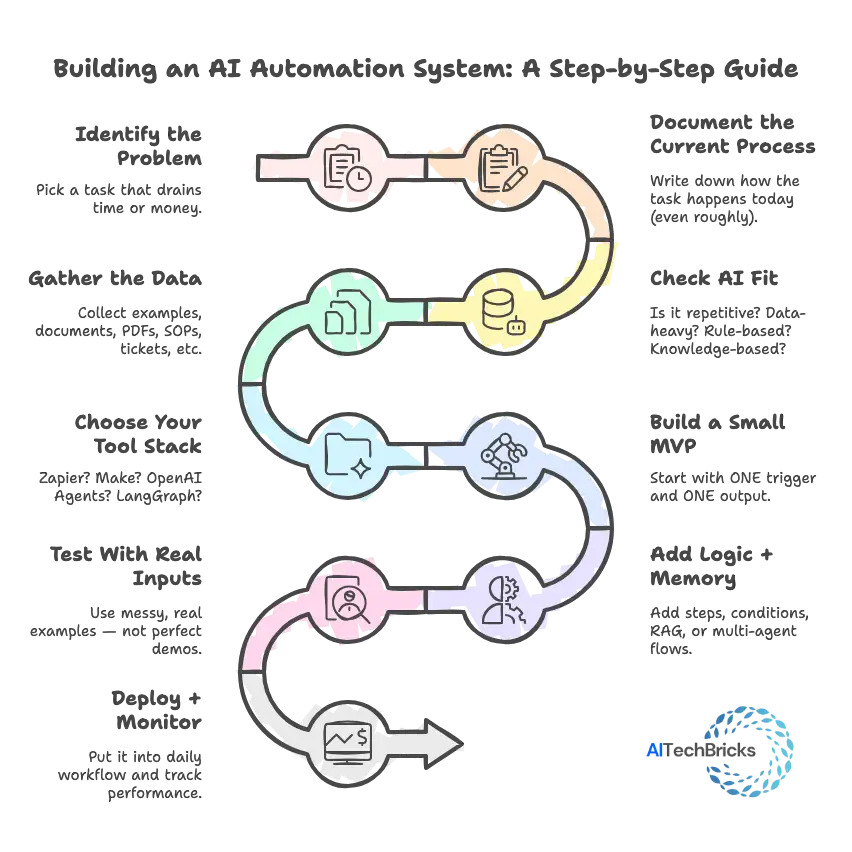
Step-by-Step Beginner Framework
Step | What You Do | Why It Matters |
1. Identify the Problem | Pick a task that drains time or money. | AI works best where pain is clear. |
2. Document the Current Process | Write down how the task happens today (even roughly). | Helps the agent follow real-world steps. |
3. Check AI Fit | Is it repetitive? Data-heavy? Rule-based? Knowledge-based? | Prevents wasting time on non-AI tasks. |
4. Gather the Data | Collect examples, documents, PDFs, SOPs, tickets, etc. | Better data = better output. |
5. Choose Your Tool Stack | Zapier? Make? OpenAI Agents? LangGraph? | Tools decide speed + reliability. |
6. Build a Small MVP | Start with ONE trigger and ONE output. | Avoids overbuilding. Faster testing. |
7. Add Logic + Memory | Add steps, conditions, RAG, or multi-agent flows. | Adds real intelligence to the system. |
8. Test With Real Inputs | Use messy, real examples — not perfect demos. | Reveals hidden edge cases. |
9. Deploy + Monitor | Put it into daily workflow and track performance. | Ensures the automation stays accurate. |
Example Workflow (Fully Explained)
Let’s walk through a real automation companies deploy today.
Example: Automated Customer Ticket Resolution
Goal: Reduce support team workload by 40%.
Step-by-Step Flow
Trigger:
New ticket arrives in Zendesk.
Step 1:
AI reads ticket → extracts intent, urgency, category.
Step 2:
Agent uses RAG → pulls right policy or knowledge-base answer.
Step 3:
Agent drafts a reply → lists source documents below.
Step 4:
If answer is high confidence → auto-send
If medium → send to human for approval
If low → escalate
Step 5:
Agent logs the resolution back into CRM.
Step 6:
Agent clusters similar issues to find trending problems.
Result
- Response time drops from 6 hours → 45 seconds
- Support load drops by 40–60%
- Managers get automatic issue clusters and weekly reports
Tools That Fit This Workflow
- OpenAI Agents (for reasoning + reply writing)
- AirOps or LangGraph (for RAG)
- Zapier/Make (for CRM + ticket routing)
- Zendesk/Freshdesk (trigger + delivery)
Common Mistakes to Avoid
Here are the mistakes that break most automations long before they reach production.
Trying to automate everything at once
Start tiny. If your first automation has 20 steps… it’s already broken.
Using clean data during testing
Real-world data is messy. Automations must be stress-tested with ugly inputs.
Not giving the agent context
Agents need:
- examples
- instructions
- rules
- policies
- terminology
- inputs + outputs
Context = accuracy.
Forgetting the “human-in-the-loop”
Not all tasks should be fully automated.
Especially:
- refunds
- urgent issues
- legal decisions
Use confidence thresholds.
No monitoring after launch
Agents drift.
Documents change.
Policies get updated.
You need:
- weekly checks
- version control
- performance metrics
Overreliance on one model
If your entire workflow depends on one model… You are one outage away from disaster.
Use fallback logic.
Not documenting the workflow
If only ONE person understands the automation → it will fail later.
Document it like a real process.
AI Automation Templates
These templates give you ready-to-run blueprints for building your own agents and workflows.
Each one includes goal → inputs → steps → rules → outputs so you can plug them into any tool (Zapier, Make, OpenAI Agents, LangGraph, CrewAI).
Template 1: Email Automation Template (General Purpose)
Perfect for: inbound emails, client communications, support, sales, operations.
Goal
Automatically read incoming emails → classify → generate response → update system.
Required Inputs
- Email body
- Sender info
- Document/policy library (optional)
- CRM or ticketing system
Workflow Steps
- Read email content
- Extract intent, urgency, metadata
- Classify email type (support / sales / request / spam / operational)
- Retrieve relevant policy or past data (RAG)
- Generate draft reply
- Apply rules (tone, length, compliance)
- Auto-send or send for approval
- Log result in CRM
Rules for the Agent
- Never hallucinate facts
- Include sources when answering from internal docs
- Flag sensitive queries to humans
- Reply only in brand voice
Output Format
- Final reply
- Summary
- Suggested next steps
- Confidence score
Template 2: Research Agent Template
Perfect for: content teams, sales research, business intelligence, founders.
Goal
Research a topic → pull insights → remove noise → generate a clean, digestible report.
Required Inputs
- Query/topic
- Web access (browser tool)
- PDFs/links (optional)
- Analyst instructions (we can add brand preferences)
Workflow Steps
- Search top 10–20 sources
- Extract structured data (facts, numbers, comparisons)
- Remove duplicates + low-quality sources
- Summarize insights by category
- Verify info against authoritative sources
- Generate final research report
- Provide citations + reliability score
Rules
- Never guess numbers
- Prioritize trusted sources (gov, academic, top-tier media)
- Group findings into themes (market size, trends, risks, opportunities)
- Add a TL;DR summary at top
Output
- Executive summary
- Key insights
- Bullet-point findings
- Competitor/comparison table
- Citation list
Template 3: Support Automation Template (RAG + Tool Use)
Perfect for: customer support, internal IT helpdesk, HR helpdesk.
Goal
Read a support ticket → find the right answer → draft response → update system.
Required Inputs
- Ticket content
- Knowledge base (policies, FAQs, docs)
- CRM/ticketing platform
- Escalation rules
Workflow Steps
- Read incoming ticket
- Extract issue, category, urgency
- Search internal documents with RAG
- Generate drafted reply
- Add source citations
- Decide action: auto-send / human review / escalate
- Update ticket status + CRM notes
- Cluster similar issues for reporting
Rules
- Never provide unsupported answers
- Always cite documents used
- Escalate refund/payment/security tickets
- Keep tone empathetic, concise, problem-solving
Output
- Final response
- Source strings
- Issue category + urgency
- Confidence score
- Recommended follow-up actions
Template 4: Lead Qualification Template (Sales Automation)
Perfect for: SaaS, agencies, B2B businesses, lead gen teams.
Goal
Evaluate leads → score them → prioritize → send personalized outreach.
Required Inputs
- Lead data (name, company, industry, size)
- Website or LinkedIn URL
- ICP criteria (ideal customer profile)
- CRM connection
Workflow Steps
- Collect lead info (browser automation or CRM)
- Enrich data (size, revenue, tech stack, signals)
- Score the lead using custom criteria
- Identify buying intent signals
- Generate personalized outreach message
- Log lead + notes into CRM
- Notify sales rep with summary
- Add follow-up reminders
Rules
- Score based on 3 buckets: ICP-fit, intent, timing
- Use friendly, concise personalization
- Avoid over-promising
- Do not spam; follow outreach cadence rules
Output
- Lead score (0–100)
- Qualification summary
- Custom outreach email
- Key selling angles
- Next-step recommendations
Future of AI Automation
The next wave of automation will introduce AI coworkers, fully autonomous systems, and even marketplaces where businesses “hire” agents instead of employees.
Below are the three biggest shifts coming fast.
AI Coworkers (The Next Normal)
Today’s agents handle tasks.
Tomorrow’s agents will handle responsibilities.
AI coworkers will function like digital teammates who:
- Remember your preferences
- Understand your projects
- Manage your inbox
- Join meetings
- Draft documents
- Handle repetitive work
- Learn from feedback
- Improve over time
These agents won’t sit in a chat window.
They’ll sit inside every app you use, ready to work behind the scenes.
Where this is already happening
- Microsoft Copilot for Work
- Google Workspace AI assistants
- Notion AI teams
- OpenAI memory-enabled agents
Impact
People will collaborate with AI the same way they collaborate with colleagues — assigning tasks, reviewing outputs, and giving feedback.
Autonomous Business Systems (AI That Runs Entire Processes)
The next evolution isn’t “AI that helps.”
It’s AI that runs the entire operation.
Think of it as giving your business a self-driving mode.
These systems will handle:
- Support from intake → resolution
- Sales from research → outreach → scheduling
- Finance from invoice → approval → reconciliation
- HR from screening → onboarding → training
- Product from feedback → clustering → PRD writing
Instead of one agent doing a task, you’ll have multi-agent loops doing entire business processes without human involvement.
What enables this shift
- Multi-agent orchestration (LangGraph, AutoGen)
- Tool-use LLMs with planning (OpenAI o-series, Claude)
- Enterprise knowledge graphs
- Memory systems
- Workflow automation platforms
Impact
Automation moves from “task-level” to department-level.
Expect companies to operate leaner, faster, and more globally — with AI running the day-to-day while humans focus on strategy and creativity.
Agent Marketplaces (Hiring AI Instead of Humans)
By 2026–2027, businesses will start “hiring” AI agents the same way they subscribe to SaaS tools.
Imagine an app store… but for AI talent.
Types of agents in these marketplaces
- AI SDRs
- AI Researchers
- AI Support Agents
- AI Designers
- AI Data Analysts
- AI Product Assistants
- AI Finance Clerks
- AI HR coordinators
Why this will explode
- Agents can specialize
- Cost per agent is tiny
- Agents work 24/7
- No onboarding
- No training
- No documentation issues
- They get better over time
Real signals today
- Character.ai agents
- Devin (AI coder)
- OpenAI GPTs
- CrewAI roles
- AutoGen multi-agent systems
- Agent builders inside Rewokable, AirOps, Zapier AI
Impact
Instead of hiring an intern, companies will hire:
- “A research agent for $29/mo”
- “A support agent for $19/mo”
- “A video editing agent for $39/mo”
A full digital workforce — on demand.
Conclusion
Teams that embrace AI agents move faster, spend less, and scale without hiring endlessly.
Teams that delay? They’ll be stuck doing work AI now handles in minutes.
This guide gave you the full picture:
- what AI automation is,
- how agents actually work,
- the tools behind them,
- 150 real automation examples,
- templates you can copy,
- and where the future is heading.
If you are exploring AI for your work, your team, or your business… start small, ship fast, and let automation take over the repetitive stuff.
The biggest wins often start with the simplest workflow.