What Is AI? (Simple Definition)
AI is just software that can think a little and learn a little, instead of waiting for you to spell out every tiny instruction.
That’s it.
If normal software is like: “Tell me exactly what to do, step by step,”
AI is more like: “Give me the goal, I’ll figure out the steps.”
Why AI matters (the real reason nobody says out loud)
Because it saves time. Like… a lot of time.
AI can read faster than us, write faster than us, detect patterns we miss, and automate tasks we didn’t even want to do in the first place.
It’s already behind your:
- phone’s face unlock
- Netflix recommendations
- Google Maps routes
- spam filtering
- shopping suggestions
- banking fraud alerts
- and yes… half the viral posts on the internet
How Does AI Work? (Beginner Mode)
Okay, so here’s the part everyone overcomplicates.
AI isn’t magic. It basically follows a three-step routine like someone preparing for an exam.
Let’s break it down the human way:
Step 1: AI Learns From Data (The Study Phase)
AI looks at tons of examples.
- Show it 1,000 cat pictures → it learns “what a cat looks like.”
- Give it 10,000 sentences → it learns how people write.
- Feed it customer emails → it learns patterns in questions.
This is the part where AI “studies” and builds its own understanding.
Think of it like your school days, a night out studying before an exam.
Step 2: AI Builds a Model (Its Brain)
After learning, AI creates a model, which is basically:
“Everything I understood from all that data packed into digital brain cells.”
This model helps it make predictions:
- “This looks like a dog.”
- “This email sounds angry.”
- “This sentence probably comes next.”
- “This customer wants a refund.”
Step 3: AI Gives an Output (The Answer Sheet)
Once trained, you give AI a question or task, and it responds based on what it learned.
Examples:
- Ask ChatGPT → it writes.
- Upload a photo → it identifies objects.
- Ask Google Maps → it finds the fastest route.
- Open Netflix → it suggests what you will like next.
Simple, right?
Real-World Beginner AI Examples
|
Everyday Task |
How AI Does It |
|
Unlocking your phone |
Compares your face to stored patterns |
|
Predicting traffic |
Analyzes millions of GPS points |
|
Sorting spam emails |
Detects suspicious patterns |
|
TikTok recommendations |
Studies what you watch + skip |
|
Translating text |
Predicts the best next word in another language |
Types of AI (Grouped into 3 Mega Buckets)
AI comes in many flavours, but beginners only need to remember three big buckets.
Bucket 1: Everyday AI (The Practical, Quiet One)
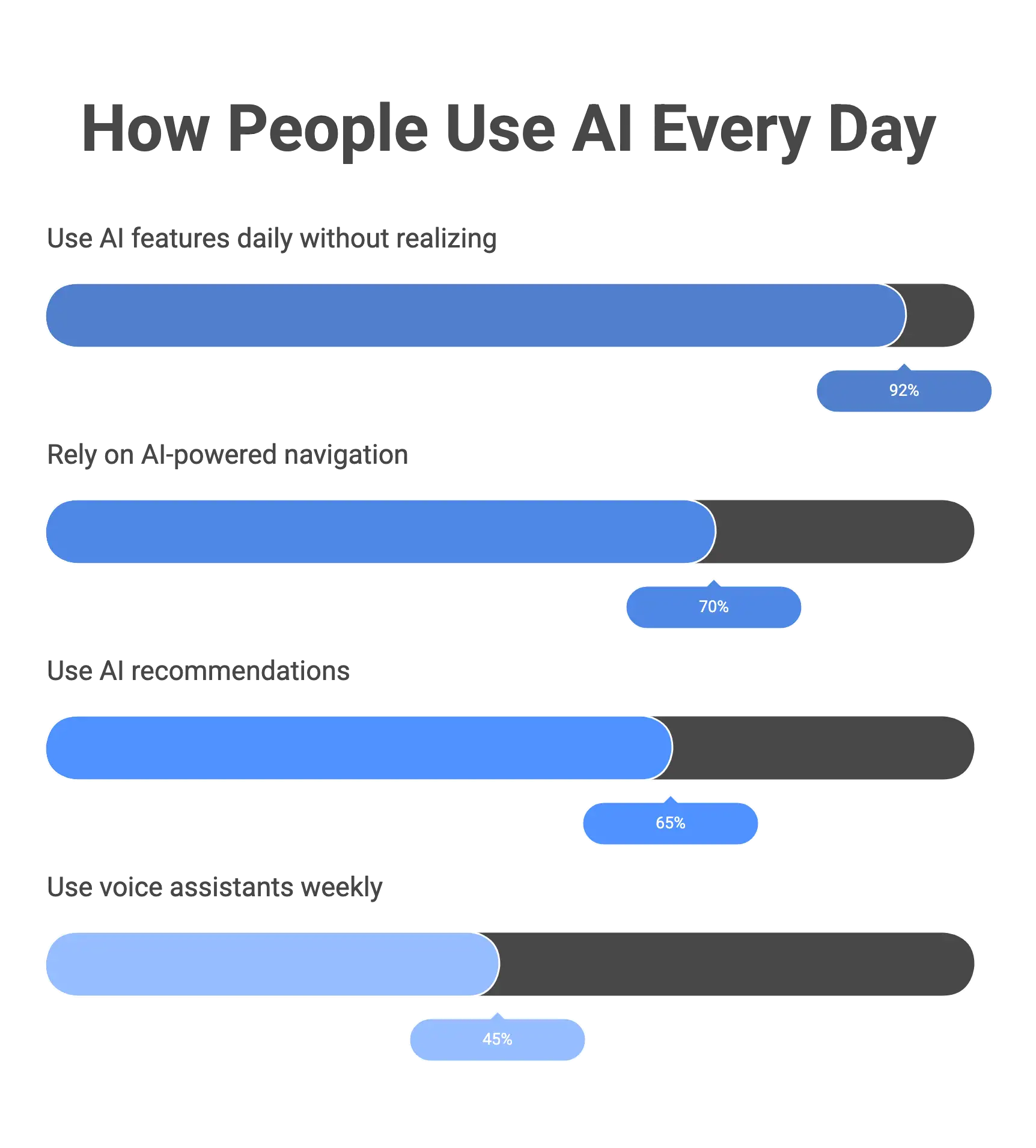
This is the AI you already use 20 times a day without realizing it.
- Face unlock
- Google Maps
- Spam filters
- Netflix recommendations
- Amazon “you might like this”
- Banking fraud alerts
These AIs are trained to do one specific job really well.
They can’t do anything else, your face unlock won’t cook biryani (sadly).
Nickname: Narrow AI
Bucket 2: Generative AI (The Creative One)
This is the fun and viral part of AI. It creates things:
- Text (ChatGPT, Claude)
- Images (Midjourney, DALL·E)
- Videos (Runway, Pika)
- Music
- Code
- Presentations
This is the AI that feels human because it understands patterns in language and creativity.
Inside this bucket you will find:
LLMs (Large Language Models)
These are models that read, write, summarize, explain, translate, and chat.
Image + Video Generators
They turn prompts into visuals, like magic, but with GPUs.
Bucket 3: Learning Systems (The Brainy Ones)
This is the “behind-the-scenes” AI category. These models learn patterns, improve over time, and make predictions.
Machine Learning (ML)
AI learns from data and makes decisions.
Deep Learning (DL)
AI learns using layers of “digital neurons” (like a mini brain).
Reinforcement Learning (RL)
AI learns by trial and error, like teaching a dog with treats.
Real examples:
- Self-driving cars
- Robots learning to walk
- Game-playing AIs (Chess, Go, Dota)
Simple Table: Types of AI (Beginner-Friendly)
|
Type |
What It Means |
Real Examples |
|
Narrow AI |
Good at one task |
Face unlock, spam filters |
|
Generative AI |
Creates new content |
ChatGPT, Midjourney |
|
Machine Learning |
Learns from data |
Predicting prices |
|
Deep Learning |
Learns through layers (like brains) |
Self-driving cars |
|
Large Language Models |
Understand + generate text |
GPT-4, Claude |
|
Reinforcement Learning |
Learns by trial and error |
Robotics, gaming |
AI vs ML vs DL vs LLM (A Quick Comparison)
These four terms confuse beginners the most. So let us do the cleanest breakdown possible.
Think of them like levels of a family tree.
- AI = The big umbrella
- ML = A part of AI
- DL = A part of ML
- LLMs = A type of Deep Learning model
Now let’s make this ultra clear.
Simple Analogy
Imagine AI is food.
- AI = All food
- ML = Fast food
- DL = Burgers (a type of fast food)
- LLMs = Cheeseburgers (a specific kind of burger)
Small → smaller → specific.
Clean Comparison Table
|
Term |
Simple Meaning |
Example |
Beginner Analogy |
|
AI |
Any tech that can “think” a bit |
Siri, face unlock |
All food |
|
ML (Machine Learning) |
AI that learns from data |
Spam filters |
Fast food |
|
DL (Deep Learning) |
ML with layers of “digital neurons” |
Self-driving cars |
Burgers |
|
LLM (Large Language Model) |
Deep learning model trained on text |
ChatGPT, Claude |
Cheeseburger (very specific) |
Short Explainers (For Beginners)
AI (Artificial Intelligence)
Any system that makes decisions or predictions.
Machine Learning (ML)
AI learns from examples instead of being manually programmed.
Deep Learning (DL)
AI uses neural networks — mini brain-like structures — to learn complex patterns.
Large Language Models (LLMs)
AI trained on text to read, write, summarize, translate, explain, and chat.
Where We Use AI Every Day?
Most people think AI lives in labs or inside ChatGPT. Nope,it is been quietly running your everyday life for years.
You are using AI from morning to night without even noticing.
Let’s see where we use it!
- On Your Phone
- Shopping & E-commerce
- Entertainment
- Travel & Maps
- Banking & Finance
- Health & Fitness
- Education
AI in Daily Life: What the Numbers Say
Top 30 AI Examples (Beginner-Friendly)
Here are the 30 Artificial Intelligence examples that we already use.
AI in Smartphones
|
Example |
What AI Does |
|
1. Face Unlock |
Identifies your face to unlock your phone. |
|
2. Portrait Mode |
Detects people and blurs background. |
|
3. Autocorrect |
Predicts intended words. |
|
4. Voice Assistants |
Understand commands and respond. |
|
5. Photo Search |
Finds “dog,” “sunset,” or “birthday” in your gallery. |
AI in Shopping & E-commerce
|
Example |
What AI Does |
|
6. Product Recommendations |
Suggests items you’re likely to buy. |
|
7. Dynamic Pricing |
Adjusts prices based on demand. |
|
8. Personalized Home Screens |
Everyone sees a different homepage. |
|
9. Review Filtering |
Detects fake reviews. |
|
10. Visual Search |
“Search by image” features on apps. |
AI in Entertainment
|
Example |
What AI Does |
|
11. Netflix Recommendations |
Suggests shows based on your habits. |
|
12. YouTube Video Suggestions |
Learns what you enjoy watching. |
|
13. Spotify Playlists |
Creates Discover Weekly, Daily Mixes. |
|
14. TikTok For You Page |
Hyper-personalized content feed. |
|
15. Auto-captioning |
Generates captions for videos. |
AI in Travel & Navigation
|
Example |
What AI Does |
|
16. Google Maps Traffic Prediction |
Uses millions of data points. |
|
17. Uber Surge Pricing |
AI adjusts pricing during peak times. |
|
18. Route Optimization |
Finds fastest route in real time. |
|
19. Flight Delay Prediction |
Airlines use ML for forecasts. |
|
20. Self-driving Car Features |
Lane detection, autopilot, sensors. |
AI in Banking & Finance
|
Example |
What AI Does |
|
21. Fraud Detection |
Flags suspicious transactions. |
|
22. Expense Categorization |
Auto-sorts your spending. |
|
23. Credit Scoring |
ML predicts loan eligibility. |
|
24. Investment Recommendations |
Robo-advisors like Groww, Robinhood. |
|
25. Chat-based Banking Support |
Answers simple queries instantly. |
AI in Health & Medicine
|
Example |
What AI Does |
|
26. Medical Image Analysis |
Detects issues in X-rays, MRIs. |
|
27. Heart Rate Monitoring |
Learns your patterns. |
|
28. Smartwatches Sleep Tracking |
Uses ML to estimate sleep cycles. |
|
29. Drug Discovery Models |
Helps scientists find new medicines. |
|
30. Personalized Fitness Tracking |
Tailored recommendations from apps. |
Key AI Terms Explained Simply (Glossary)
Here are 50 essential terms, explained the easy way.
Core AI Terms
|
Term |
Simple Meaning |
|
AI (Artificial Intelligence) |
Computers doing tasks that normally need human thinking. |
|
Model |
The “brain” the AI builds after learning from data. |
|
Algorithm |
A set of rules the AI follows. |
|
Neural Network |
A digital version of how human brains work (kind of). |
|
Training |
When AI studies examples to learn patterns. |
|
Inference |
When AI uses what it learned to answer you. |
Machine Learning Terms
|
Term |
Simple Meaning |
|
Machine Learning (ML) |
AI learns from data instead of manual programming. |
|
Supervised Learning |
AI learns with labeled examples. |
|
Unsupervised Learning |
AI finds patterns on its own. |
|
Reinforcement Learning (RL) |
AI learns by trial and error. |
|
Classification |
AI puts things into categories. |
|
Regression |
AI predicts numbers (price, score, rating). |
Deep Learning Terms
|
Term |
Simple Meaning |
|
Deep Learning (DL) |
ML with many neural network layers. |
|
CNN (Convolutional Neural Network) |
AI that analyzes images. |
|
RNN (Recurrent Neural Network) |
AI that handles sequences like text. |
|
Transformers |
The architecture behind modern AI like GPT. |
|
Attention Mechanism |
The part of AI that decides what to “focus” on. |
Generative AI Terms
|
Term |
Simple Meaning |
|
Generative AI |
AI that creates images, text, audio, or video. |
|
LLM (Large Language Model) |
AI trained on massive text to understand and write. |
|
Prompt |
The message you give AI. |
|
Prompt Engineering |
Crafting better inputs to get better outputs. |
|
Hallucination |
When AI confidently gives a wrong answer (lol). |
|
Temperature |
Controls AI creativity. Higher = more creative. |
Computer Vision Terms
|
Term |
Simple Meaning |
|
Image Recognition |
AI that knows what’s in a picture. |
|
Object Detection |
AI finds objects + their locations. |
|
Segmentation |
AI outlines shapes in an image. |
|
OCR (Optical Character Recognition) |
Turns images into text. |
Common AI Concepts Beginners Hear Everywhere
|
Term |
Simple Meaning |
|
Dataset |
A collection of examples AI learns from. |
|
Fine-Tuning |
Teaching AI new skills with extra training. |
|
Embedding |
AI’s way of turning text into numbers it understands. |
|
Token |
Tiny chunks of text (words or pieces of words). |
|
Context Window |
How much text the AI can “remember” at once. |
|
Inference Cost |
How much it costs to run an AI model. |
Industry & Practical Terms
|
Term |
Simple Meaning |
|
Chatbot |
A simple conversational assistant. |
|
AI Agent |
An AI that takes actions, uses tools, completes tasks. |
|
Automation |
Things happening without manual effort. |
|
RAG (Retrieval-Augmented Generation) |
AI that looks up real info before answering. |
|
API |
A way apps talk to each other. |
|
Latency |
How long AI takes to respond. |
Safety & Ethics (Beginner-Friendly)
|
Term |
Simple Meaning |
|
Bias in AI |
When AI makes unfair decisions because of bad training data. |
|
Privacy |
Keeping user data safe. |
|
Safety Guardrails |
Rules that stop AI from doing harmful things. |
|
Explainability |
Understanding why AI made a decision. |
How to Start Learning AI?
Here is the easiest way to start:
Step 1: Understand the Basics (0–2 Weeks)
Before touching tools, get comfortable with:
- What AI is
- How it works
- ML vs DL vs LLM
- Everyday applications
- Simple terminology
Resources:
- YouTube (free, visual, easy)
- Beginner-friendly blogs (like this one
 )
)
Step 2: Play With AI Tools (1–3 Weeks)
The fastest way to learn is: use AI daily.
Start with:
- ChatGPT
- Claude
- Gemini
- Canva AI
- NotebookLM
- Runway (for videos)
Try things like:
- Summarize a doc
- Write a small email
- Generate an image
- Ask it to explain a topic
Treat this phase like exploring a new phone, tap stuff, try stuff, don’t overthink.
Step 3: Learn Basic Prompting (1–2 Weeks)
Prompting is basically “how you talk to AI.”
Focus on:
- Giving context
- Setting style
- Giving examples
- Asking step-by-step
- Making AI think before answering
Small skill, huge impact.
Step 4: Start Mini Projects (2–6 Weeks)
Projects make everything “click.”
Try building:
- a resume analyzer
- a quiz bot
- a document summarizer
- an AI notetaker
- a chatbot trained on your own text
This is where confidence kicks in.
Step 5: Explore AI Courses (Optional but helpful)
A few good places:
- Coursera
- Udemy
- Google AI Crash Course
- Fast.ai (for ambitious beginners)
- YouTube playlists
Pick one and stick to it, not twelve at once.
Step 6: Learn a Bit of Python (Optional)
If you want to move from “beginner” → “builder,” Python helps.
You only need:
- variables
- lists
- functions
- simple scripts
Not the entire textbook.
Step 7: Join AI Communities
This helps you stay updated and motivated.
Try:
- Reddit (r/learnmachinelearning, r/ChatGPT)
- Discord groups
- LinkedIn creators
- Local meetups
Learning is easier when you are not alone.
The No-Stress Beginner Rule
Don’t try to learn everything.
Just learn the next thing.
AI is huge, but you don’t need all of it to start making cool stuff.
AI Tools for Beginners (Grouped by purpose)
Let’s keep this easy and group them by what they help you do.
Tools for Chatting & Learning
These tools help you understand concepts, write things, ask questions, or explore ideas.
|
Tool |
What It Helps You Do |
|
ChatGPT |
Ask anything, write anything, learn anything. |
|
Claude |
Great for reading long PDFs and explaining them. |
|
Gemini (Google) |
Search + AI + Google knowledge combined. |
|
NotebookLM |
Create notes, summaries, and study guides instantly. |
If AI had a “starter kit,” this would be it.
Tools for Images & Creativity
Perfect for beginners who want to create visuals without learning design.
|
Tool |
What It Helps You Do |
|
Canva AI |
Create posters, flyers, thumbnails in minutes. |
|
DALL·E |
Generate beautiful images from text. |
|
Midjourney |
Advanced image generation (stunning results). |
Even if you can’t draw a circle, these tools will make you look creative.
Tools for Video Content
Beginner-friendly tools for fun videos, edits, and AI animations.
|
Tool |
What It Helps You Do |
|
Runway |
AI video editing + generation. |
|
Pika Labs |
Turn text into short videos. |
Great for students, content creators, startups — basically anyone who wants fast videos.
Tools for Notes, Docs & Productivity
Your digital life becomes 10× easier.
|
Tool |
What It Helps You Do |
|
Notion AI |
Summaries, notes, writing help, organizing content. |
|
Microsoft Copilot |
Built into Word, Excel, PowerPoint. |
|
Google Workspace AI |
Helps write emails, summarize docs, plan tasks. |
These feel like having a tiny assistant inside your laptop.
Tools for Building Things (Beginner Projects)
When you’re ready to experiment a little.
|
Tool |
What It Helps You Do |
|
Replit |
Run simple Python or JS AI projects. |
|
HuggingFace Spaces |
Try models in your browser. |
|
Glide Apps |
Build simple AI apps with no code. |
You will feel like a mini-developer, but without the pain of learning everything at once.
Mistakes Beginners Make (How to Avoid Them?)
Learning AI is exciting… and also a little overwhelming.
Most beginners trip on the same 6 mistakes, so let’s save you months of frustration.
Trying to Learn Everything at Once
AI is huge, like “universe-level huge.”
If you try to understand every model, every tool, every concept… you will burn out faster than your old engineering laptop.
Fix:
Learn one thing at a time.
Small steps → big progress.
Overthinking You Need Maths or Coding First
Nope.
Most beginners think AI = maths + coding + suffering.
But modern AI tools handle all that behind the scenes.
Fix:
Start with tools and simple projects.
Coding comes later if you need it.
Watching 40 tutorials… but not building anything
YouTube is great. But watching tutorials without touching a single project is like watching gym videos and hoping for abs.
Fix:
Build tiny things:
- a chatbot
- a summarizer
- a resume analyzer
Projects stick. Videos fade.
Using AI blindly without giving context
AI is smart, but not psychic.
If you give half instructions, you will get half-baked answers.
Fix:
Always tell AI:
- who you are
- what you want
- the style you prefer
- examples
- any rules
Context is EVERYTHING.
Getting scared of wrong answers (“AI hallucinations”)
Yes, AI sometimes says nonsense with full confidence. But that is not a reason to panic, it is just predicting patterns.
Fix:
- Double-check outputs.
- Use trusted sources.
- Add “think step-by-step” prompts.
Thinking AI will replace you, instead of upgrading you
AI doesn’t take jobs. People who use AI take the jobs of people who don’t.
Fix:
Learn how to collaborate with AI. Treat it like a helper, not a threat.
AI Beginner Projects (Easy, Fun & Confidence-Boosting)
These mini–projects help you understand AI by doing, not just watching videos.
Pick one and try it today, you will be shocked how quickly you can build something useful.
Resume Analyzer (Beginner-Friendly, No Code)
What it does:
Uploads your resume → AI gives improvements → generates an updated version.
Tools: ChatGPT, Gemini, Claude, Notion AI
Why it’s great: You learn formatting + prompt structure.
Quiz Generator Bot
What it does:
Ask it: “Create a 10-question quiz on ___,” and it instantly builds one.
Tools: ChatGPT / NotebookLM
Why beginners love it: Zero setup. Instant results.
Document Summarizer (Your First Useful Automation)
What it does:
Summarizes PDFs, meeting notes, articles, or research papers in your chosen style.
Tools: ChatGPT, Claude, NotebookLM
Level: Beginner
Bonus: Test with your old college notes, very satisfying.
Simple Image Classifier (Beginner ML Project)
What it does:
Teaches AI to recognize cats vs dogs (or any two categories).
Tools: Teachable Machine, Lobe (no code)
What you learn:
- Training
- Testing
- Model accuracy
Feels like “real AI,” without the headache.
AI Note-Taker (Your Productivity Booster)
What it does:
Takes notes from voice, meetings, or text → summarizes → organizes.
Tools: Notion AI, Fireflies
Why it’s cool: You feel the power of automation instantly.
Chatbot Trained on Your Text
What it does:
Feed it your notes, policies, or documents → creates a custom chatbot.
Tools: ChatGPT custom GPT, NotebookLM
Why it’s amazing: It answers just like you because you trained it.
“Ask Me Anything” Research Bot
What it does:
You give a topic → AI fetches information → breaks it down → shows final report.
Tools: ChatGPT with browsing / Perplexity
What you learn: How AI retrieves and organizes information.
Future of AI (Non-Scary Outlook)
Let’s be honest: every time “future of AI” comes up, people imagine robots taking over, jobs disappearing, or some sci-fi movie storyline.
Reality?
The future of AI is way more practical… and way less dramatic.
Here’s what beginners actually need to know.
AI will become your “digital helper,” not your replacement
Think of AI as the super-organized friend we all wished we had:
- handles boring tasks
- reminds you of things
- helps you write
- summarizes long stuff
- gives you ideas
- helps you learn faster
Jobs won’t vanish — tasks inside jobs will change.
You’ll still be in control.
Every app you use today will quietly get smarter
AI will sneak into your daily life, just like autocorrect did.
Expect:
- smarter search
- better recommendations
- personalized learning
- automatic organization
- faster customer support
It’s evolution, not revolution.
AI Agents will become normal (and helpful)
In the next 2–3 years, most people will have tiny “AI coworkers” that handle:
- emails
- scheduling
- research
- filing documents
- writing summaries
- creating small projects
They won’t replace you.
They’ll remove all the tiny tasks that drain your energy.
More creative tools, not fewer creative jobs
AI will help you:
- make videos
- create designs
- write scripts
- edit photos
- plan ideas
- brainstorm
Creativity gets easier, not replaced.
New career paths will open (beginner-friendly ones too)
Just like social media created new jobs in the 2010s, AI is creating new ones now:
- AI content specialist
- AI automation assistant
- Prompt designer
- AI operations associate
- AI tester / evaluator
You don’t need to be a programmer to join the AI wave.
AI regulation will focus on safety & fairness
Governments are working on:
- data safety
- AI transparency
- ethical guidelines
This means AI will become more reliable and safer for everyday users.
Conclusion
AI looks big from the outside, but once you step in, you realize it’s just a collection of simple ideas stitched together with smart tools.
You’ve already met half of them in your everyday life without even knowing — from Netflix to Maps to the way your phone unlocks each morning.
Now you understand what AI is, how it works, why everyone is talking about it, and how you can start learning it without drowning in jargon or 500-page textbooks.
Start small.
Play with tools.
Try a mini project.
Ask AI to teach you something new.
Every little step stacks up — and before you know it, you’ll stop feeling like an “AI beginner” and start feeling like someone who actually gets this stuff.
This is your starting point.
The rest is just curiosity and a few clicks.