In general, we expect AI to do everything, like generating posts, creating images, and scheduling content, right? At least I have expected these! But then I realized that AI tools for social media are a little different. Because creating content is very easy, but creating content that people engage with is much harder.
Some AI tools for social media really helped me save time, while others give generic posts that sound like everyone else.
In this blog, I am going to show you exactly which AI tools worked for me and the workflows that truly helped me in my work. I have tried all these tools, so you can directly jump into the workflows that your work needs. Saving your time.
Important Points We Will Cover
- Different types of AI social media tools
- The best tools based on use case
- When to use each tool
- Real social media workflows
- What worked for me and what didn’t
Best AI Tools for Social Media (Quick Answer)
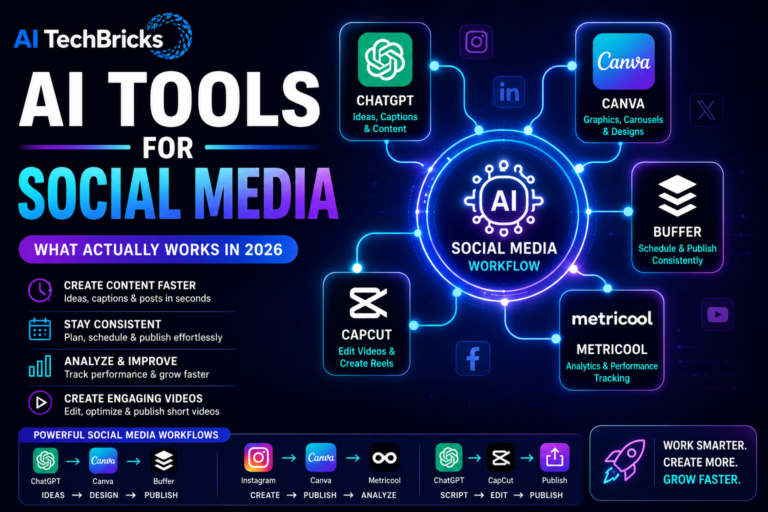
Here is a simple setup that works well for any social media marketer.
- ChatGPT → ideas and captions
- Canva → visuals and graphics
- Buffer → scheduling
- Metricool → analytics
- CapCut → short-form videos
As I always say, do not jump into all the tools at once. Start with one tool, explore it, and go with your goal.
What Actually Worked for Me
After experimenting with different tools, I noticed these things. The biggest improvement was not about creating more content. It was creating content consistently.
ChatGPT helped me brainstorm ideas quickly. Canva saved time when creating visuals. Buffer removed the stress of publishing every day. And the best results came when I stopped trying to automate everything. People still want content that feels human. AI helped me move faster, but it did not replace my creativity.
Types of AI Social Media Tools
Social media have different jobs to solve, and some tools solve these. If you understand that, choose the tools will become easier.
Content Creation Tools
These tools help with captions, ideas, hooks, and post drafts. ChatGPT and Copy.ai are popular examples. If you create content regularly, this one matters.
Design Tools
Visuals are just as important as text for readers and for search engines. Tools like Canva make it easier to create graphics, carousels, and social media images without needing advanced design skills. This is the best tool for the beginner who wants to play with the designs.
Scheduling Tools
Posting today and forgetting tomorrow will not give you any good outcomes. Consistency always matters. Platforms like Buffer will help schedule posts across multiple channels. There are self-hosted platforms that allow scheduling. You can choose which is easier for your daily tasks.
This saves time and reduces manual work.
Analytics Tools
Publishing content is only part of the process. Understanding what is working is equally important. Metricool helps track engagement, reach, and performance.
Video Tools
Short-form video is growing fast. CapCut and similar tools make editing much easier. These are useful if you are creating reels, shorts, or TikTok videos.
AI Tools for Social Media Comparison Table
| Tool | Category | Best For | Free | Paid |
|---|---|---|---|---|
| ChatGPT | Content Creation | Ideas and captions | Yes | Yes |
| Canva | Design | Graphics and carousels | Yes | Yes |
| Buffer | Scheduling | Publishing content | Yes | Yes |
| Metricool | Analytics | Performance tracking | Yes | Yes |
| CapCut | Video | Reels and short videos | Yes | Yes |
| Copy.ai | Content Creation | Marketing copy | No | Yes |
Best AI Tools for Social Media by Use Case
For Instagram
- Canva
- CapCut
- ChatGPT
Great for carousels, reels, and captions.
For LinkedIn
- ChatGPT
- Canva
- Buffer
Simple workflow.
For Facebook
- Buffer
- ChatGPT
Useful for maintaining consistency.
For X (Twitter)
- ChatGPT
Good for ideas and short-form content.
For YouTube Shorts
- CapCut
Makes editing significantly easier.
For Beginners
- ChatGPT
- Canva
When to Use Each Tool
Use ChatGPT when you need ideas.
If you are staring at a blank screen, ChatGPT is usually the fastest way to get moving.
I use it for:
- Post ideas
- Hooks
- Captions
- Carousel outlines
It works best when you already have some direction.
Use Canva when visuals are important
Canva makes it easy to create:
- Carousels
- Infographics
- Instagram posts
- LinkedIn graphics
Especially if design is not your strongest skill.
Use Buffer when consistency becomes difficult
Publishing manually every day gets tiring and boring, and Buffer removes that pressure.
It helps you plan content and stay consistent.
Use Metricool when you want data
Posting content without tracking results is like driving without a map.
Metricool helps you understand:
- Reach
- Engagement
- Best-performing posts
Data helps you improve.
Use CapCut when creating short-form videos
Video editing used to feel complicated until CapCut launched. This tool makes it easier for beginners too.
Useful for:
- Instagram Reels
- YouTube Shorts
- TikTok videos
Real AI Tools for Social Media Workflows
Here are the workflows for each platform which worked and will work for your daily tasks. Combining multiple tools will help you work even faster.
LinkedIn Workflow
- ChatGPT → Canva → Buffer
- Ideas → Visuals → Publishing
This is one of my favourite workflows because it removes a lot of friction.
Instagram Workflow
- ChatGPT → Canva → Metricool
- Content → Design → Analytics
Short Video Workflow
- ChatGPT → CapCut → Publish
- Script → Edit → Publish
You do not need expensive software to create short-form videos.
Content Repurposing Workflow
- Blog Article → ChatGPT → Canva → Buffer
One piece of content becomes multiple social posts.
This is probably one of the biggest time savers.
Insights from Using AI Tools for Social Media
So, most of the tools can create content faster and very few help create engaging content. The biggest improvement comes from consistency, but not from using too many tools. I have also noticed that audiences are still responding to content that feels personal and human.
AI will help with speed but, people will connect with experiences.
What Didn’t Work for Me
Earlier, I made one mistake. I focused too much on automation. Everything became optimized. But nothing felt authentic. I also noticed that using too many tools made things more complicated. Instead of saving time, I spent time managing tools. Keeping things simple worked much better. Even today, I prefer using a small stack instead of chasing every new platform.
Free vs Paid AI Social Media Tools
For all the paid tools, there is a free version. Always make use of the free tool to 100% and then, only when you really need that paid version, use it. For most of our social media work, I prefer free tools.
I even have subscriptions to Adobe and others, but I do not have time to use them all at once; still, my work is getting done with free tools and in much less time.
FAQs
What are the best AI tools for social media?
ChatGPT, Canva, Buffer, Metricool, and CapCut are among the most popular AI tools for social media.
Which AI tool is best for Instagram content?
Canva and CapCut are excellent for creating Instagram graphics and reels, while ChatGPT helps with captions and ideas.
Can AI create social media posts?
Yes. AI tools can generate captions, hooks, and ideas. However, adding your own experiences and personality makes content more engaging.
Do I need multiple AI tools for social media?
Not necessarily. Most people can start with just ChatGPT and Canva. As your workflow grows, additional tools can help save time.
Can AI replace social media managers?
No. AI can speed up content creation and scheduling, but creativity, strategy, and understanding your audience still require human judgment.
Conclusion
AI tools can make social media easier. But they do not replace creativity. Start small. Focus on consistency. Use what works. Ignore the hype. That is usually where the best results come from.