You have typed a prompt into ChatGPT and thought, “Why does this sound so… bland?” or worse, “That’s not what I asked for at all!”, tired of trying multiple GPT prompts but still the same output.
You are not alone. Reddit, X, and Quora are full of frustrated users asking the same question:
“Why does my ChatGPT output suck?”
The truth? It is rarely the model’s fault. It is the prompt we give.
GPT is like a very intelligent intern. It works brilliantly at lightning speed, but has no directions and is sometimes clueless unless you give crystal clear instructions. The better you prompt, the sharper the response.
Do you want to master how to give the right prompt? Here we are. This guide will be your map to master that skill. The art and science of writing a powerful GPT prompts that make AI actually useful. Whoever you are, a content creator, developer, marketer or just an AI curios brain, you will learn how to go from “meh” outputs to a jaw-dropping results that sound like a real expert wrote them.
Table of Contents
How to Excel GPT Prompts?
In this guide we will learn how to actually give prompts to any GPT to get the perfect output.
- How GPT models interpret language (and why a single misplaced word can confuse it)
- The 4 essential ingredients of a great prompt
- Advanced prompt engineering tactics like Chain-of-Thought and Few-Shot Learning
- Real-world templates for different jobs, from coding to content writing
What This Guide Isn’t:
This isn’t a “copy-paste 100 magical prompts” post. Because you will find plenty of those online (and they age faster than memes).
This is about understanding how prompting works, so you can design your own with smarter, faster, and infinitely more effective.
The Foundation, How do GPT Models Think?
Before we go into the templates and fancy techniques, let me clear one thing up, GPT does not understand the language the way we do. It just predicts it.
For example, if you ask, “write a funny tweet about AI,” it does not think, “what is funny?” it scans billions of examples it is seen during the training and guesses the most probable next words based on your prompt.
That is like tryiing to write a love letter by averaging every love letter ever written. You will get something that sounds right, but feels robotic.
That is the reason why the major output sounds generic. GPT is only as creative, specific and human as the instructions you give it. As we see in the movies, when some one says the robot to “throw away in anger”, it doesn’t understand your emotion and throws it away. Same way we have to be very specific about what we want.
This is the secret most people miss:
“The best prompts are long, they are layered”.
Each layer tells the model something different, who it is supposed to be, what it should do, how it should response and in what style.
That is what we will decode next in the 4-element prompting system, the core framework every AI power users swears by.
By the end of the next section, you will know exactly how to make any GPT sound like a witty marketer, a seasoned developer, or a patient teacher, all by changing just a few words.
The Core Blueprint: The 4-Element Prompting System
For every great GPT output there should be a great input.
For example, let us think it as a cooking. If your ingredients (your prompt) are bland, no Michelin-star model can save your dish. Right?
In the same way, a great output neads a perfect and clear input for any GPTs.
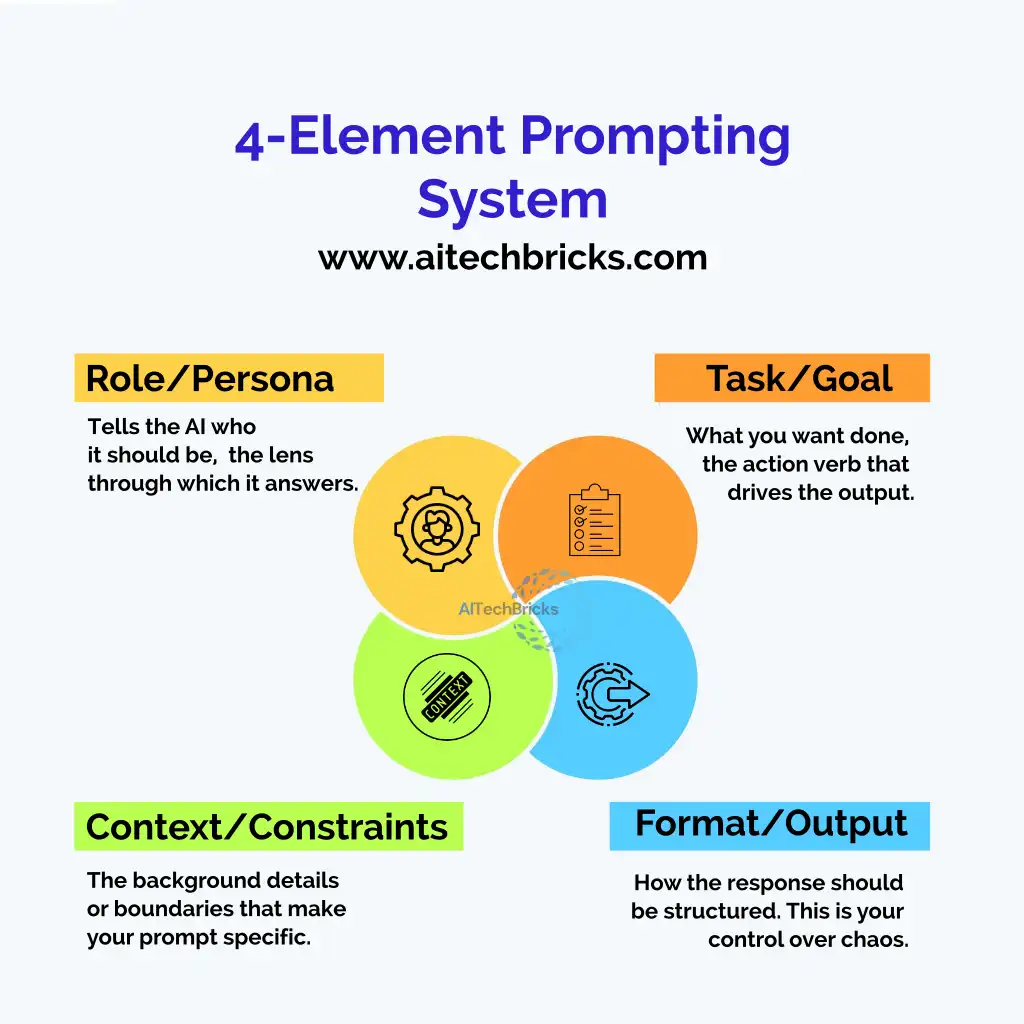
After thousands of experiments, there is one pattern which consistently separates “meh” answers from magic ones is the 4-Element Prompting System.
These four parts are Role, Task, Context and Format which are the backbone of every high-performing prompt, no matter the use case.
Below is the clear breakdown:
Element | Description | Example |
1. Role / Persona | Tells the AI who it should be, the lens through which it answers. | “Act as a former McKinsey consultant.” |
2. Task / Goal | What you want done, the action verb that drives the output. | “Create a SWOT analysis for Tesla.” |
3. Context / Constraints | The background details or boundaries that make your prompt specific. | “Targeting Gen Z on TikTok; keep it fun but credible.” |
4. Format / Output | How the response should be structured. This is your control over chaos. | “Respond in a 5-point bulleted list with short explanations.” |
Let us see why this works so well all the time.
- Role adds personality, set the tone of the content. The same model can sound like Harvard professor or a stand-up comic depending on this one line.
- Task drives focus. It prevents GPT from writing a long blog post when you just wanted a summary.
- Context adds accuracy. Without it, GPT makes “educated guesses” which is AI code for hallucinating confidently.
- Format adds productivity. It saves you from cleaning or reformation AI text later.
Pro Tip:
If you are in doubt, start your prompt with the role, it connects everything else.
Example: “You are a growth marketer at a SaaS startup. Write a 3-tweet thread about why user retention beats acquisition.”
Advanced Toolkit: Techniques for GPT to produce Human-Quality Output
There are many times I felt the GPTs output was fine but it is kind of robotic, there is no emotion, that human touch is missing. That is when I did all kinds of experiment. You are not alone, if you are in the same boat.
This happens because most people will stop after writing one decent prompt. The pros? They iterate, refine, and manipulate the model’s behaviour, just like a director shaping an actor’s performance.
Here is the secret sauce to make GPT sound convincingly human.
Chain-of-Thought (CoT): Make GPT “Think” Step-by-Step
You would have probably noticed that GPT sometimes jumps to conclusions or gives half-baked answers.
Chain-of-Thought prompting fixes that. It forces the model to explain its reasoning before the final answer, producing smarter, more logical responses.
Prompt Example:
“Think step-by-step before answering. First, explain your reasoning briefly, then give the final solution.”
It is like asking a student to “show their work.” The quality skyrockets.
Iterative Refinement: The Art of the Follow-Up
Great prompts rarely happen in one take.
Professionals treat GPT like a creative partner, they revise until it gets the tone, depth, and rhythm right.
You can try this sequence:
- Ask GPT for an initial draft.
- Then say: “Now rewrite this to sound more casual and witty, like a LinkedIn influencer.”
- Then: “Add a relatable example and a punchy metaphor.”
By the third pass, it will sound more human than half of Twitter.
The “Anti-AI” Prompt Technique
Here is where things get spicy.
If AI detection tools can spot robotic writing, why not use those same patterns against them?
Borrow cues from our 27-Point Humanization Checklist, and tell GPT to break its own habits.
Prompt Example:
“Avoid robotic patterns. Vary sentence lengths. Add small imperfections or personal touches. Use idioms or humor wherever they are appropriate.”
That is how you turn “AI-sounding text” into something your readers can’t believe came from a machine.
Style Anchoring: Borrow a Human Voice
Do you want GPT to sound like Morgan Freeman, Sheryl Sandberg, or your favorite Substack writer? Then you can.
Prompt Example:
“Write this in the style of a witty tech journalist, concise, slightly sarcastic, and rich with real examples.”

Anchoring GPT to a human tone source instantly makes its output richer and more natural.
Next, we will apply everything you have learned to real-world impact, how businesses, creators, and professionals use these techniques daily to save time, innovate, and even close deals.
The Business & Productivity Playbook: Real Prompts, Real Impact
Let us be honest here, most people use ChatGPT to “save time.” But the smartest ones use it to multiply outcomes. If you are planning a product launch, fine-tuning your resume, or debating a business strategy, the right GPT prompts can give you a clear picture of it all.
Here is your curated Playbook of Prompts built for modern professionals who want results but not robotic text.
The Business Strategist Prompt
When to use: When you need a quick, structured insights for decision-making, risk assessment, or strategic debates.
Prompt Template:
“Act as a business strategist. Perform a SWOT analysis for [company/product] in the [industry] market. Include potential threats, and offer two counterstrategies. End with a short paragraph titled ‘The Devil’s Advocate View.’”
Why it works: You get both sides of the argument, optimism and realism, without paying for consulting hours.
The Productivity Architect Prompt
When to use: When you are stuck managing 15 things at once and need an AI to systemize your mess.
Prompt Template:
“You a’re a productivity coach. Build a 3-tier system to manage daily, weekly, and quarterly tasks for a [role or team type]. Suggest specific tools or automations for each layer.”
Why it works: GPT helps you in designing the frameworks that are customized, not copy-paste templates from a generic productivity blog.
The Resume & Career Coach Prompt
When to use: When you are rewriting your resume and want it to sound recruiter-proof, not AI-generated.
Prompt Template:
“Act as a career strategist and rewrite my resume summary for a [job role]. Make it sound confident but human, no clichés. Use action verbs and quantify at least two achievements.”
Why it works: It addresses the ‘chat gpt resume prompts’ keyword while delivering an actionable transformation, from bland to bold.
The Financial Analyst Prompt
When to use: When you want insights into your business performance, KPIs, or investment opportunities in a real fast.
Prompt Template:
“Act as a financial analyst. Analyze the following business data: [paste data]. Summarize key patterns, risks, and 3 cost-optimization ideas. Present insights in a markdown table.”
Why it works: Tables + context-based insights = clarity without spreadsheets and caffeine.
The Creative Strategist Prompt
When to use: When you are brainstorming campaigns, content, or product angles and want GPT to think like a strategist, not a slogan generator.
Prompt Template:
“You are a creative strategist for a global brand. Generate 5 campaign concepts around [topic]. For each, include: target emotion, key message, and a one-line hook.”
Why it works: Combines emotional intelligence with structure, a rare mix that sparks ideas and keeps them executable.
Pro Tip: Stack Prompts Like Lego
You don’t need one perfect prompt, you need a sequence.
Start broad (“Act as a strategist”), refine tone (“Make it sound data-backed but conversational”), and then format (“Summarize in bullets and end with a quote”).
That is how the pros create human-level strategy decks in minutes.
Unleashing Creativity, Prompts That Go Viral, Visual, and Beyond
There is a big difference between content and a scroll-stopping content.
One disappears in a feed. The other makes people pause mid-scroll, mutter “Whoa,” and tag a friend.
That second kind? You can absolutely teach GPT to make it.
Let us brainstorm some creative gold prompts that help you write viral posts, craft striking visuals, and even spark storytelling magic.
The Viral Content Generator Prompt
When to use: When you want GPT to think like a social media growth hacker, not a polite assistant.
The Visual Prompt for AI Art & Videos
When to use: When you are exploring Midjourney, DALL·E, or Runway and want your visuals to look professional and not like AI chaos.
Prompt Example:
“Generate an image prompt for [subject] in [style]. Include camera angle, lighting, background, and mood. Example: ‘A cyberpunk city at dusk, low-angle shot, neon reflections, cinematic mood.’”
Why it works: It combines storytelling with visual direction, the difference between ‘AI mush’ and a masterpiece.
The Storyteller Prompt
Why it works: It forces the model to think emotion-first, not keyword-first, the secret sauce behind posts that actually go viral.
Prompt Example:
“Act as a novelist. Create a 3-paragraph story around [theme or conflict]. Use sensory details, dynamic dialogue, and one unexpected twist at the end. Keep it under 250 words.”
Why it works: It brings voice back into AI writing, that raw, unpredictable humanness that algorithms can not fake.
The Character Builder Prompt
When to use: When you are developing scripts, brand personas, or creative projects with personality depth.
Prompt Template:
“Act as a character designer. Build a persona for [brand/story]. Include: name, quirks, tone of voice, and a defining catchphrase. Add one hidden flaw that makes them relatable.”
Why it works: Every great brand or story starts with a great character, even if that character’s a chatbot.
The Campaign Concept Prompt
When to use: You’re brainstorming new marketing campaigns or creative projects that need a spark of originality.
Prompt Template:
“Act as a creative director for [industry]. Develop 3 campaign concepts around [topic]. For each, describe: target audience, emotional hook, and unique call-to-action.”
Why it works: It turns GPT into your on-demand brainstorm partner, the one that never runs out of coffee or ideas.
Quick Tip: Mix Logic with Chaos
Do you want GPT to sound alive? Give it one structured instruction (“3 ideas for LinkedIn”) and one chaotic one (“each idea should sound like it was written by a stand-up comic”).
That tension, between structure and surprise, is where all the viral magic happens.
Your Future as a Prompt Engineer
Here is the truth. GPT is not replacing you. It is amplifying you.
Every time you write a better prompt, you are not just talking to a machine; you are building a skill that future-proofs your career. It is the new literacy, knowing how to think in instructions.
So the next time you open ChatGPT or Claude, do not type the first thing that pops into your head.
Instead, ask yourself:
- “What role should this AI play for me?”
- “What output do I actually need?”
- “How can I make this sound unmistakably human?”
That mindset shift alone will put you ahead of 90% of AI users.
And remember, prompts are not magic spells. They are mirrors.
What you put in will determine what comes out.
So, feed it your best thinking. The machine will follow.
Conclusion
Finally, you know how a GPT works, how should we give a prompt, and different types of prompts for productivity, creativity and businesses. In the upcoming blog posts, there are more prompts curated for specific roles and industries, so stay tuned to AITechbricks.com
If you have any queries, feel free to comment them below and we will be happy to help you.
Frequently Asked Questions (FAQs)
1. How do I make ChatGPT write like a human?
The trick is in the prompt design. Tell the AI who it is, who it is writing for, and what tone to use. For example:
“Act as a content writer who writes like they’re explaining things to a friend over coffee.”
Then, add personality hints: “Include small jokes or relatable examples.”
It is like seasoning food: too much and it is cringe, too little and it is bland. So balance it.
2. What is a “prompt token,” and why should I care?
Think of tokens as the building blocks of text. Every word (or part of it) eats up a few tokens and GPT models have a limit.
More tokens = more context = more cost and slower responses.
If your output cuts off mid-sentence? You have hit the token wall.
Keep prompts concise, but complete, like writing an elevator pitch instead of a TED Talk.
3. What’s the best way to write a GPT prompt?
Follow the 4-Element Prompting System:
- Define the Role — who the AI should be.
- Clarify the Task — what you want done.
- Add Context — who it’s for, why it matters.
- Specify the Format — how you want it presented.
Simple, but life-changing. It is like switching from “Do my homework” to “Teach me how to solve this problem.”
4. Should I use a high or low temperature when generating outputs?
Use low temperatures (0–0.3) for factual tasks like coding, analysis, or summaries.
Use higher ones (0.7–1.0) when you want creativity, like brainstorming or storytelling.
Temperature is basically your “chaos meter.”
Zero means “play it safe.” One means “let’s get wild.”
5. Can I use these prompts on other models like Claude, Gemini, or LLaMA?
Absolutely. The principles stay the same, but each model has its own quirks.
Claude loves structured context. Gemini thrives on detail. LLaMA responds better to concise clarity.
Think of them as different co-workers, you willl get better results when you learn how each one “thinks.” So, you will have a complete smart AI tech team with you.
6. What’s the difference between an Instructional Prompt and a Few-Shot Prompt?
- Instructional Prompt: You just tell the AI what to do (“Write a summary of this article in 100 words”).
- Few-Shot Prompt: You show examples first, then ask it to follow that style.
Example:
“Here are 2 examples of catchy blog titles. Now create 3 more in the same style.”
Few-shot = faster learning, less editing.
7. How long should a GPT prompt be?
- Instructional Prompt: You just tell the AI what to do (“Write a summary of this article in 100 words”).
- Few-Shot Prompt: You show examples first, then ask it to follow that style.
Example:
“Here are 2 examples of catchy blog titles. Now create 3 more in the same style.”
Few-shot = faster learning, less editing.
8. What’s the single most underrated skill in prompting?
Iteration.
Do not settle for the first response. Refine. Rephrase. Redirect.
Ask: “Now explain this for a 10-year-old.” or “Give me a spicier version.”
That is how you move from average AI output to “Did a human write this?”